

A client called us last spring three days before a product launch. The footage was gorgeous — a full day with a two-camera crew, drone passes, the works. But the edit was a mess. Nobody had logged the audio takes, the color was inconsistent between cameras, and the “final” cut had already gone through nine rounds of notes from six different stakeholders, none of whom agreed with each other. We ended up re-cutting the whole thing in 48 hours. That project hit almost every mistake to avoid in post-production in one shoot, and none of it needed to happen.
Most of those mistakes don’t show up on day one. They show up in week three, when the deadline is close and there’s no room left to fix them. The good news is that almost every one of them is preventable if you know where to look before you start.
The Real Mistakes to Avoid in Post-Production
Post-production is where a video either becomes what you pitched in the treatment or quietly turns into something else. The camera work can be flawless and the story can still fall apart in the edit bay if nobody’s watching for the handful of errors that repeat, project after project, regardless of budget size. We’ve seen six-figure commercial shoots and $3,000 testimonial videos make the exact same mistakes. Budget isn’t the variable. Process is.
A lot of these problems actually start earlier than people think. If your team skipped a solid plan during pre-production, post gets stuck untangling a knot that shooting day created. Editors can’t manufacture coverage that was never captured, and no amount of color correction fixes footage shot in mismatched white balance across three locations.
Mistake #1: Treating the Edit Like a Sorting Job, Not a Plan
The biggest one first: opening the raw files and just starting to cut, hoping the story reveals itself. It sometimes does, eventually, after burning hours you didn’t budget for. A real post-production process starts with a paper edit or at minimum a written structure — what the video needs to say, in what order, and how long each section should run. Editors who skip this step end up with a rough cut that’s twice the target length, and then the real work becomes cutting it down instead of building it up. That’s backwards, and it’s slower.
Give your editor (or yourself) ten minutes with a notepad before touching the timeline. Write the beats. Everything gets faster after that.
Mistake #2: Leaving Audio for “Later”
Audio gets treated as a finishing touch, something you sweeten right before delivery. That’s exactly backwards. Bad audio is the single fastest way to make a video look cheap, even when the visuals are excellent — viewers forgive rough picture quality far more readily than they forgive audio that clips, hums, or drops out mid-sentence. Sync issues, room tone gaps, and inconsistent levels between clips all compound the longer you wait to address them.
Pull your audio in first, clean it as you go, and treat dialogue levels as a priority equal to the visual cut — not an afterthought bolted on at the end.
Mistake #3: Color Grading Without a Reference Point
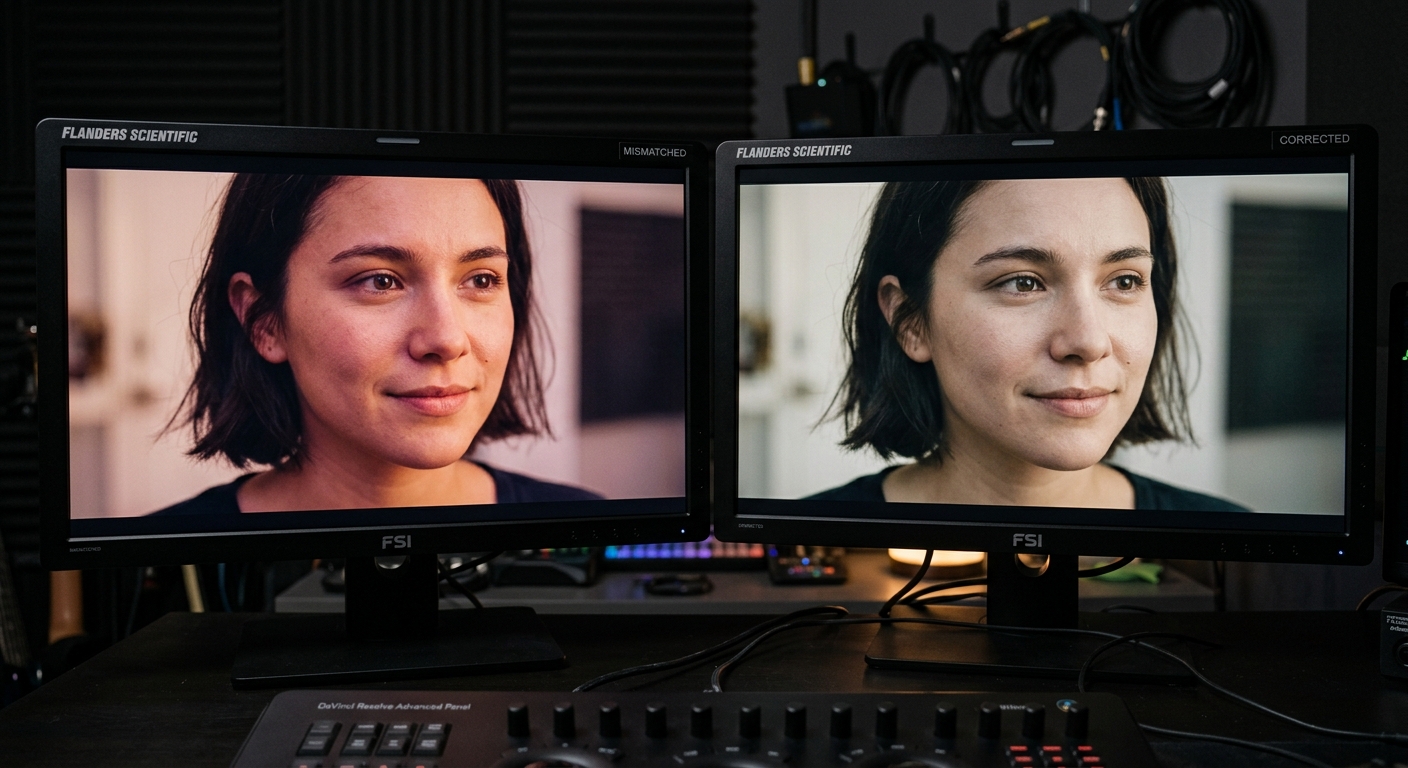
Grading without a plan is how you end up with a video that looks great on your editor’s monitor and slightly off on everyone else’s. It’s also how skin tones drift warm in one scene and cool in the next when footage came from two different cameras or lighting setups. Color grading isn’t about slapping a trendy LUT on the timeline and calling it cinematic — it’s about matching shots to each other first, then pushing a consistent look second. Skip step one and step two just amplifies the inconsistency.
If your footage came from multiple cameras or multiple days, budget real time for shot matching before anyone touches a creative look. It’s tedious. It’s also the difference between a video that looks intentional and one that looks like it was stitched together in a hurry.
Mistake #4: Feedback Chaos From Too Many Voices

This is the one that kills timelines. Six stakeholders, six sets of notes, none of them reconciled before they reach the editor. One person wants it shorter, another wants a scene added back in, a third wants a completely different piece of music, and the editor is left trying to satisfy contradictory instructions in a single revision. The result is a cut that pleases nobody because it’s been pulled in five directions at once.
Designate one person to consolidate feedback before it goes to the edit team. If you’re working with video editors outside your organization, this matters even more — they need a single, prioritized list, not a group chat thread they’re expected to parse. Two structured rounds of notes will get you further than five messy ones.
Mistake #5: No Version Control, No Backup Plan
Somebody overwrites the wrong file. A drive fails the night before delivery. The “final_v3_ACTUALFINAL” file gets confused with “final_v3_ACTUALFINAL_2.” These aren’t hypotheticals — they happen on real projects, regularly, and they’re entirely avoidable with basic project hygiene. Name your versions with dates, not adjectives. Back up footage in at least two physical locations before you start editing, not after you’re deep into the cut. And keep your project files backed up as often as your footage, because a corrupted project file with unrecoverable footage is a special kind of bad day.
Mistake #6: Rushing the Export Specs
The edit’s locked, everyone’s relieved, and then the file gets exported with the wrong frame rate for the platform it’s headed to, or compressed so hard for email that the client sees blocky artifacts in every dark scene. Different platforms want different specs — a broadcast delivery, a YouTube upload, and an Instagram Reel are not the same export, and treating them as one file that works everywhere is how quality gets lost in the last five minutes of a project that took weeks.
Build export specs into your plan at the start, not as a final checkbox. It takes ten minutes and it’s the difference between a video that looks sharp everywhere it airs and one that looks slightly off on the platform that actually matters most to the client.
Why This Matters More in a Market Like Las Vegas
Production timelines here move fast — conventions book out studios and crews months in advance, and turnaround windows for corporate and event video are often compressed to days, not weeks. When you’re producing Las Vegas video production work on a convention or event schedule, there’s rarely slack in the calendar to fix a broken post workflow after the fact. The mistakes above get more expensive, not less, when the delivery date is fixed and the client’s next trade show opens on schedule whether the edit is ready or not.
That’s the argument for treating post-production as a planned phase with its own checklist, not an improvised scramble that starts once footage lands on a drive.
Getting It Right the First Time
None of this requires an enormous budget. It requires a plan, a single point of feedback, and an editor who treats organization as part of the craft rather than a chore to skip. If your last project went sideways in the edit bay, the fix usually isn’t a bigger budget for round two — it’s tightening the process before the next shoot even happens.
If you’d rather hand the whole thing to a team that already runs this checklist by default, take a look at our production and post-production services and tell us what you’re building. We’ll tell you honestly what it takes to get it done right and on time.
Frequently Asked Questions
What is the most common mistake to avoid in post-production?
Starting to edit without a written structure or plan. Editors who cut before mapping the story end up with a bloated rough cut that takes longer to fix than it would have taken to plan properly up front.
How much time should post-production take for a corporate video?
It varies with length and complexity, but a typical 2-3 minute corporate video needs 1-2 weeks for editing, color, audio, and a couple of revision rounds. Rushing this timeline is where most quality problems creep in.
Why does my video look inconsistent even though the footage looked fine on set?
This is almost always a color matching issue between cameras, lighting setups, or shooting days. It needs to be corrected in a dedicated shot-matching pass before any creative color grade is applied.
How many rounds of revisions should we expect during editing?
Two structured rounds of consolidated feedback is standard. More than that usually signals the notes weren’t organized before reaching the editor, which slows the whole process down.
Can bad audio really ruin an otherwise good video?
Yes, and it’s often the deciding factor in how professional a video feels. Viewers tolerate imperfect visuals far more than they tolerate audio that clips, hums, or has inconsistent levels between clips.
